

API/Integration process
The API/integration process between Capexplan and your systems is quite straightforward. We normally breakdown the process into four (4) main parts:
Determining the fields to integrate (creation of field map)
The first part of the API/integration process is determining all the fields that will be included in the integration process.
The direction of data transfer
For each field on our mapping list, we then indicate the data transfer direction. Directions can be from customer system to Capexplan and from Capexplan to customer system.
The type of integration and the frequency of data transfer
In this part, we decide together what type of integration will be needed.
The error handling
In this last part, we outline how errors will be handled and how customers will be informed. Capexplan includes a default error log which Super Users have access via their Dashboard.
During the API/integration process, our integration teams will work only on the Capexplan side. Meaning that we do not touch or go directly into our customers systems. We do however assist our customers at each step of the process.
The end goal is to develop the best integration possible according to the customer’s systems and needs. While most of the integration is collecting data from other systems into Capexplan (ex: Spend information), information can and does go both ways. A typical integration includes having Capexplan sending information to the customer’s systems in a timely manner.
Determining the fields to integrate (creation of field map)
The first part of the API/integration process is determining all the fields that will be included in the integration process. What we recommend to our customers is to start with the anticipated end results, namely the reports that the customer needs to generate, or fields that other systems need to capture. From there, we can establish which fields are required.

Default fields
Capexplan can integrate any field. This includes default fields which are already in Capexplan, such as budget, capex request fields, and tracking information. Here, we can integrate with customer systems at any level of detail that is needed. For example, one customer might only want to capture the Actuals (Spend) at the capex level while another customer might want to capture the Actuals at the line item of each individual Invoice. Since it is easier to consolidate data later than to attempt to separate it, we recommend capturing data at the lowest level (greatest level of detail) whenever possible.



Custom fields
The same applies to custom fields which customers create in the capex request templates. Any custom field created can be integrated. Once a custom field is created, it will become available for API/integration.

Non Capexplan fields
Customer can also integrate fields which are not part of the capex process. For example, KPIs and other metrics which can be generated by other systems and need to be added to a capex request. Those fields can also be part of the API/integration process with Capexplan.
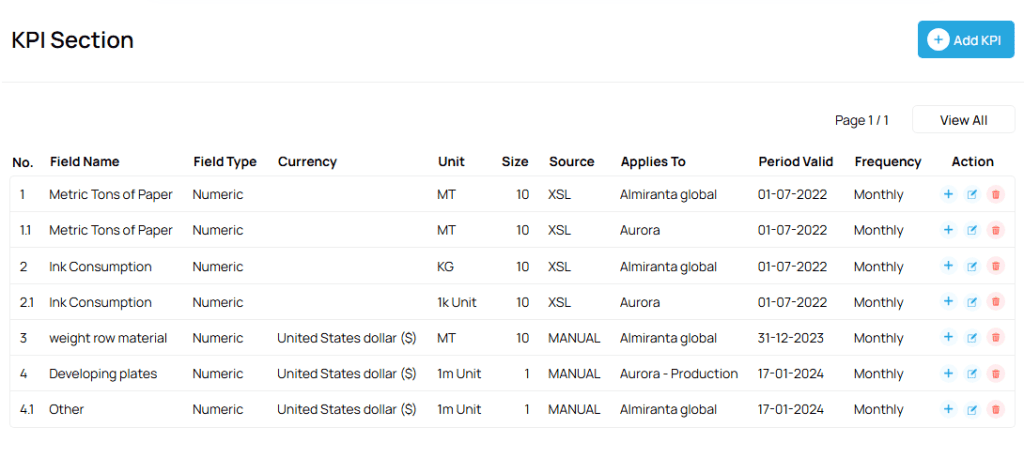
Once the fields are identified, we then map them out in order to associate the customer fields with the Capexplan fields. For example, a field name might be named capex project name in the customer’s system but would be named (by default) request name in Capexplan. So, for each field, we create a simple spreadsheet list to associate the name of the field in the customer’s system to the name of the field in Capexplan.
Once this is completed, we add the information on the type of field (ex: numeric, currency, date, text, multiple choice, etc.) and the field size (ex: 100 chars if the field if text field).
We now have a complete list of fields that we need to integrate at our disposal.
The direction of data transfer
For each field on our mapping list, we then indicate the data transfer direction. Directions can be from customer system to Capexplan and from Capexplan to customer system.
Comment will also be added to the mapping file, for later referral.
This part completes the mapping process.
The type of integration and frequency of integration
In this part, we decide together what type of integration will be needed. Since we can integrate each customer’s business unit separately or in whole, it is important to determine how we want to do the integration. Within a same customer, we can integrate with multi systems. For example, a customer might have business units on one continent that have one ERP and business units on a second continent that uses another ERP. And the same customer could have business units on a third continent that has another system. Each business unit can be integrated differently for maximum flexibility.
For customers with commercial systems such as accounting, ERP, business intelligence, data warehousing, analytics, and other systems, we will favor an integration via APIs. For this, we prefer to use Web Services since Capexplan has a dedicated REST API site. Integration in this case is done using real-time data transfer in both directions.
For customer systems that do not offer integration via APIs, it is always possible to integrate via shared folders (normally SFTPs) on a time base. This process does not always require human intervention and we work with our customers to automate the process as much as possible. For example, the customer’s system might send a flat (xml, csv) file to a shared folder and from there, Capexplan automatically collects the files and populates the fields in Capexplan. Same for data transferred from Capexplan to a customer’s system. Here, frequency can vary according to the customer’s needs (ex: hourly, 4 times a day, daily, weekly, etc.).
The error handling
In this last part, we outline how errors will be handled in the API/integration process and how customers will be informed. Capexplan includes a default error log which Super Users have access via their Dashboard. Here, all data transmission is logged. Capexplan validates the field type as well as the quality of the data. For example, if Capexplan needs to receive a date which needs to go into a date field. The system will first validate if the field received is a date. Then the system will apply some parameters to validate if the date is possible (ex: 1490 would not be a valid date for Capexplan even if it is a date). These parameters for validation are determined together with each customer. Capexplan includes a number of parameters by default.
Once all parts are completed, the testing process can start.


API Integrations
- SAML 2.0 /SSO (Single SignOn)
- Bulk import budgets and chart of accounts
- Integrate any field with any ERP system (including SAP/Oracle/MS Dynamics and many others)
- Explan Suite
- Import historical capex requests, budgets, and actuals from current system into Capexplan